Countdown Timer — Free Framer Component for Events & Launches
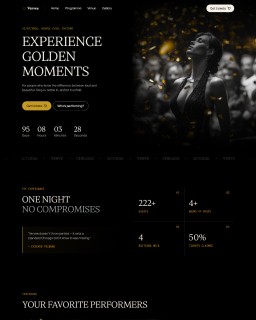
Countdown Timer is a free Framer component that displays a live countdown to any target date or event. Built for Framer projects of all kinds — product launches, event pages, coming soon screens, sale deadlines — it updates every second and freezes cleanly at zero when the time is up.
Flexible Layout for Any Design
Choose between Auto Row mode (all units in a single horizontal row) or Grid mode (2×2 arrangement). Both modes support fill and fixed sizing, so the component adapts to your layout whether you need it full-width or a fixed compact block.
Full Typography and Color Control
Number font, label font, number color, and label color are all exposed as separate controls in the properties panel. Adjust font family, weight, size, and spacing without touching code. Label spacing, alignment, cell alignment, padding, and row/column gaps are also fully configurable.
Timezone Support
25 timezone options built in — set the countdown to fire at the correct local time for your audience, whether you're targeting New York, London, Tokyo, or anywhere in between.
Features
Live Countdown: Updates every second — Days, Hours, Minutes, Seconds.
Freezes at Zero: Stops cleanly when the target date is reached, no negative values.
25 Timezones: Built-in timezone selector for global events.
Two Layout Modes: Auto Row (horizontal) and Grid (2×2) — switch in one click.
Fill & Fixed Sizing: Works with any layout width.
Customizable Typography: Separate font controls for numbers and labels.
Color Controls: Number color and label color set independently.
Spacing Controls: Label spacing, padding, row gap, column gap — all adjustable.
Alignment Options: Content alignment and cell alignment both configurable.
No Code Required: All customization done in Framer's properties panel.
Free to Use: Paste into any Framer project — no purchase needed.
Frequently asked questions
How do I add Countdown Timer to my Framer project?
Copy the component URL from this page, open your Framer project, click anywhere on the canvas, and paste it. The Countdown Timer appears instantly — no purchase needed.
What can I customize in the Countdown Timer?
Target date, timezone (25 options), layout mode (Auto Row or Grid), number font, label font, number color, label color, label spacing, alignment, cell alignment, padding, row gap, and column gap — all available in the properties panel. No code needed.
Can I use the Countdown Timer in multiple Framer projects?
Yes — once you have the component URL, you can paste the Countdown Timer into as many Framer projects as you like.
Can I use the Countdown Timer inside a template I bought from Sebadam.supply?
Yes — the Countdown Timer is compatible with any Framer project, including all templates from Sebadam.supply. Paste it onto your canvas and customize fonts and colors to match your template's design.
Categories
Paste it into your project